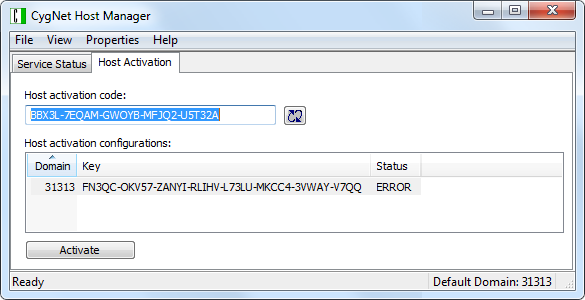
The Host Activation page of the CygNet Host Manager utility shows the activation status for the host on the active ambient domain. See Host Activation for more information.
Note: CygNet hosts do not shut down automatically when they fall out of activation compliance. You will, however, receive warnings in various CygNet client applications (CygNet Explorer, CygNet Studio, CygNet Vision, and FMS Explorer) if a host is not activated. Best practice recommends using the Service Monitoring Service (SVCMON) to monitor status and set up notifications.
You can use CygNet Host Manager to activate a host, check activation status, and update activation status. You can also use it to request a Site Activation Key for a computer, even if the services have never been started.
The properties on the Host Activation page are described below.
| Property | Description |
|---|---|
|
Host activation code |
The host activation code for the host. |

|
Click to update the status of host activation on the selected domain. |
|
Host activation configurations |
For the selected domain the following configuration items are displayed:
|
|
Activate |
Click to Activate the selected host. |
To Activate a CygNet Host
Activating a host is a two-part process.
1) Send the Site Code to CygNet Support to obtain an Activation Site Key.
2) Enter the Activation Site Key and activate the host.
In a multi-host system, the site to be activated does not have to be running, but at least one ARS on the Domain must be running. In a single-host system, the ARS must be running.
Step 1: Sending the Site Code
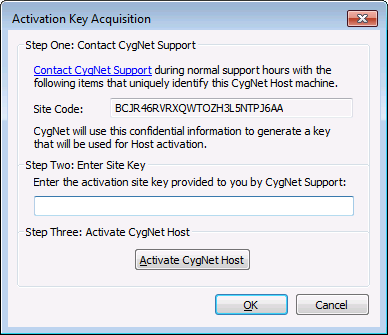
Step 2: Entering the Activation Key
See Host Activation Verification for information about host activation errors.
Note: Use CygNet Host Manager to add multiple hosts on the same machine where the Host Manager utility is running, and to manage their Start, Stop, and service domain settings. Each host must be activated using the instance of CygNet Host Manager running from its respective \Utilities or \Services folder.

|
|
|

